
Create a Named Punch
Named Punches are used to define specific conditions for earning a punch toward a Punch Card.
To create a Named Punch:
-
Select Campaigns from the top navigation bar, then select Punch Cards > Punch Cards from the side navigation menu. The Punch Cards screen is displayed.
-
Search for and select the desired Punch Card (see
-
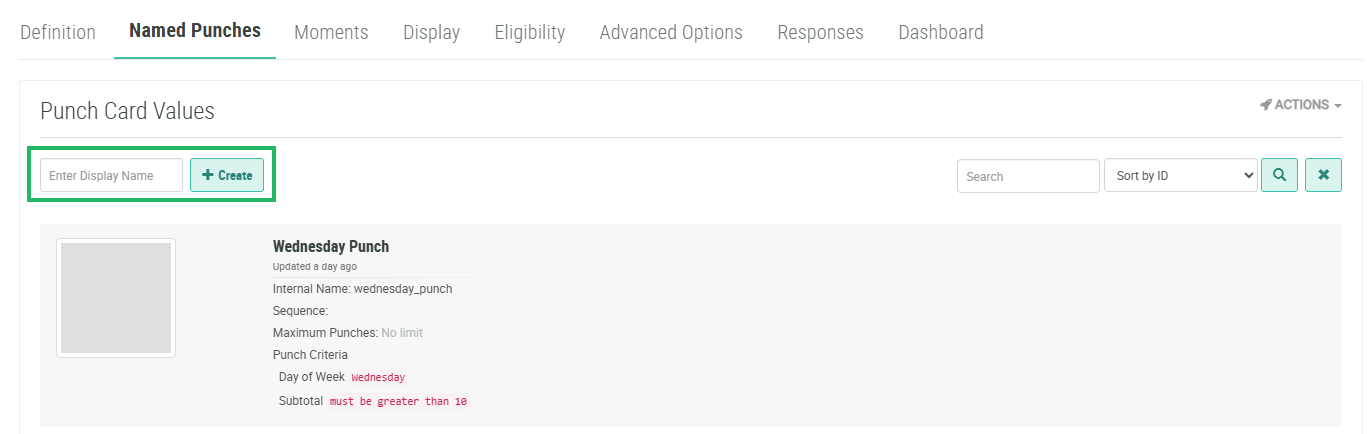
Select the Named Punches tab.
-
In the Enter Display Name field, enter the name of the new Named Punch.
-
Click Create. The Add Named Punch pop-up window is displayed.
-
The Display Name field is populated with the value you entered above; optionally edit this value.
-
The Internal Name is automatically populated based on the Display Name value. This field is not editable by default. To edit the Internal Name, check Edit Internal Name. A confirmation dialog box is displayed; click Ok. Edit the Internal Name value.
-
The Status drop-down menu is automatically populated with Active.
-
Optionally, to assign a thumbnail image to this item, click Choose File. Browse to and select the desired image file, then click Open.
-
Optionally, in the Sequence field, enter a numeric value. This field allows you to arrange the Named Punches into a specific sort sequence.
-
Optionally, in the Maximum Punches field, enter the maximum number of times that a Member can earn this Named Punch when trying to complete the Punch Card.
-
Optionally, you can set a maximum number of times that a Member can earn this Named Punch within a time period, such as "once per day." In the Rate Limit field, enter the maximum number. From the Punches Per drop-down menu, select the time period. If you prefer not to set a limit, leave the Rate Limit field blank.
-
Optionally, define Punch Criteria for this Named Punch. See below for details on Punch Criteria.
-
Click Save.
Punch Criteria
Punch Criteria are logical conditions that allow you to define more complex scenarios for Members to earn a Named Punch.
Note: Punch Criteria are on optional feature that must be enabled within your Loyalty account by means of a Program Setting. See Program Settings Category - Punchcards for more information.
To define Punch Criteria for a Named Punch:
-
Within the Add Named Punch pop-up window, click Add Punch Criterion.
-
From the Criteria Type drop-down menu, select the desired criteria type. Enter the conditions for the Punch Criteria, as described below.
 Day of Month
Day of Month allows you to define conditions based on one or more days of the month, such as “the 1st and 15th of the month,” for example.
-
From the Criteria Type drop-down menu, select Day of Month.
-
Select one of the following options:
-
Static: Enter a comma-separated list of the days of the month.
-
Dynamic: Select a Member Attribute that contains the days of the month.
-
Day of Week
Day of Week allows you to define conditions based on one or more days of the week, such as “Mondays and Wednesdays,” for example.
-
From the Criteria Type drop-down menu, select Day of Week.
-
Select one of the following options:
-
Static: Check the desired days
-
Dynamic: Select a Member Attribute that contains the days of the week.
-
Day Part
Day Part allows you to define conditions based on a custom named part of the day. Day Parts are defined within a Program Setting, and require a label, a start time, and an end time. For example, you could define a "Happy Hour" Day Part that starts at 9:00 PM and ends at 10:00 PM. By means of a Day Part Punch Criteria, you could require that a Member make a purchase during Happy Hour in order to qualify for this Named Punch. See Program Settings Category - Punchcards for more information.
-
From the Criteria Type drop-down menu, select Day Part.
-
Select one of the following options:
-
Static: Check the desired Day Parts.
-
Dynamic: Select a Member Attribute that contains the Day Part.
-
Subtotal
Subtotal allows you to define conditions based on the order subtotal, such as “greater than $10,” for example.
-
From the Criteria Type drop-down menu, select Subtotal.
-
From the drop-down menu, select a mathematical operator.
-
In the text field, enter the desired value.
Total
Total allows you to define conditions based on the order total, such as “greater than $10,” for example.
-
From the Criteria Type drop-down menu, select Total.
-
From the drop-down menu, select a mathematical operator.
-
In the text field, enter the desired value.
Qualifying Subtotal
Qualifying Subtotal allows you to define conditions based on the order subtotal for all qualifying items, such as “subtotal for all qualifying items is greater than $50,” for example. Qualifying items are defined as part of an Order Rule.
-
From the Criteria Type drop-down menu, select Qualifying Subtotal.
-
From the drop-down menu, select a mathematical operator.
-
In the text field, enter the desired value.
Qualifying Line Amount Subtotal
Qualifying Line Amount Subtotal allows you to define conditions based on the individual cost of each qualifying item, such as “cost of the qualifying item must be greater than $10.” Qualifying items are defined as part of an Order Rule.
-
From the Criteria Type drop-down menu, select Qualifying Line Amount Subtotal.
-
From the drop-down menu, select a mathematical operator.
-
In the text field, enter the desired value.
Category
Category allows you to define conditions based on a product’s inclusion in a Product Category. For example, the Member must purchase an item in the “Appetizers” product category.
-
From the Criteria Type drop-down menu, select Category.
-
Select one of the following options:
-
Static: Enter one or more comma-separated product categories.
-
Dynamic: Select a Member Attribute that contains the product category names.
-
-
If you selected multiple product categories, from the drop-down menu, select the logical operator (AND or OR) that controls how multiple category names are processed. For example, if you entered three category names, and the Member needs to purchase an item from any one of them, you would select an OR operator.
SKU
SKU allows you to define conditions based on a product SKU number. For example, the Member must purchase product SKU 4567.
-
From the Criteria Type drop-down menu, select SKU.
-
Select one of the following options:
-
Static: Enter one or more comma-separated product SKUs.
-
Dynamic: Select a Member Attribute that contains the product SKUs.
-
-
If you selected multiple product SKUs, from the drop-down menu, select the logical operator (AND or OR) that controls how multiple SKUs are processed. For example, if you entered three SKUs, and the Member needs to purchase any one of them, you would select an OR operator.
Location
Location allows you to define conditions based on a purchase location.
-
From the Criteria Type drop-down menu, select Location.
-
Select one of the following options:
-
Static: Enter one or more comma-separated locations.
-
Dynamic: Select a Member Attribute that contains the locations.
-
Channel
Channel allows you to define conditions based on a purchase channel.
-
From the Criteria Type drop-down menu, select Channel.
-
Select one of the following options:
-
Static: Enter one or more comma-separated channels.
-
Dynamic: Select a Member Attribute that contains the channels.
-
Payment Amount
Payment Amount allows you to define conditions based on the purchase payment amount.
-
From the Criteria Type drop-down menu, select Payment Amount.
-
From the drop-down menu, select a mathematical operator.
-
In the text field, enter the desired value.
Payment Network
Payment Network allows you to define conditions based on the payment network used to make a purchase, such as Visa or Discover, for example.
-
From the Criteria Type drop-down menu, select Payment Network.
-
Select one of the following options:
-
Static: From the drop-down menu, select a payment network. Repeat this step as needed to add additional payment networks.
-
Dynamic: Select a Member Attribute that contains the payment networks.
-
Payment Type
Payment Type allows you to define conditions based on the payment type used to make a purchase, such as Cash or Credit Card, for example.
-
From the Criteria Type drop-down menu, select Payment Type.
-
Select one of the following options:
-
Static: From the drop-down menu, select a payment type. Repeat this step as needed to add additional payment types.
-
Dynamic: Select a Member Attribute that contains the payment types.
-
-
Repeat the above steps as needed to define additional Punch Criteria. Multiple Punch Criteria are joined with an AND operator, meaning a purchase must meet the conditions in ALL defined Punch Criteria to qualify for this punch.
-
Click Save.
